If you have submitted an IGNOU project, dissertation, internship report, field work, or practicum and are waiting for an update, you can check your IGNOU project status online. The status portal helps students check whether their project-related marks or grades have been transmitted by the concerned Study Centre or Regional Centre after the evaluation process.
Students often search for terms such as IGNOU project status, IGNOU project status check, IGNOU project submission status, and IGNOU project marks status when they are waiting for their project to be updated in the university records.
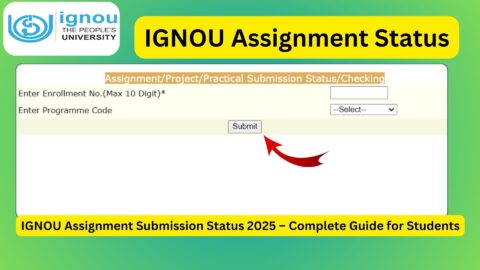
IGNOU provides an online status page where students can enter their enrolment number and programme code to check the available status. The official portal currently identifies the service as Assignment/Project/Practical Awards/Marks Transmission Status and notes that the status is reflected after marks or grades are transmitted by Study Centres or Regional Centres following the evaluation process.
Important Links and Information for IGNOU Project Status
| Information | Details |
|---|---|
| Check IGNOU Project Status | https://isms.ignou.ac.in/changeadmdata/StatusAssignment.asp |
| Status Portal | Assignment/Project/Practical Awards/Marks Transmission Status |
| Details Required | Enrolment Number and Programme Code |
| Enrolment Number | Enter your IGNOU enrolment number |
| Programme Code | Select the applicable programme code |
| IGNOU Official Website | https://www.ignou.ac.in |
| Project Section Email | projects@ignou.ac.in |
| Regional Centre | Contact your concerned Regional Centre for programme-specific queries |
| Grade Card | Check your grade card separately for updated marks/grades |
What Is IGNOU Project Status?
IGNOU project status refers to the online information available regarding the transmission of marks or grades related to project and other practical components. The Student Evaluation Division handles several components of student evaluation, including assignments, project reports, internships, field work, practicals, dissertations and viva-voce, depending on the programme.
A project is an important academic component for students enrolled in programmes where project work, dissertation, internship, field work or another practical component is included in the curriculum.
After submitting your project according to the applicable IGNOU instructions, the concerned authorities need to process and evaluate it. Once the relevant marks or grades are transmitted, information can be reflected through the status system.
Therefore, if you have submitted your project recently and the portal does not immediately show an update, it does not necessarily mean that your project has been rejected or lost. The official status page specifically states that status is reflected only after marks or grades have been transmitted by the concerned Study Centre or Regional Centre after the evaluation process.
How to Check IGNOU Project Status Online?
Checking the IGNOU project status is relatively simple. You need your enrolment number and programme code before opening the status page.
Follow the steps below.
Step 1: Visit the IGNOU Project Status Portal
First, open the official IGNOU status page:
https://isms.ignou.ac.in/changeadmdata/StatusAssignment.asp
This page is used for checking Assignment/Project/Practical Awards/Marks Transmission Status.
Step 2: Enter Your Enrolment Number
On the status page, you will see an option to enter your enrolment number.
Enter the enrolment number associated with your IGNOU student record. The portal currently indicates that the enrolment number can contain a maximum of 10 digits.
Make sure that you enter the number correctly. Avoid adding unnecessary spaces or using a different identification number when the portal specifically asks for the enrolment number.
Step 3: Select Your Programme Code
After entering your enrolment number, select your programme code from the available programme list.
For example, students may have programme codes associated with their respective undergraduate, postgraduate, diploma, certificate or other IGNOU programmes.
Your programme code should match the programme in which you submitted the project.
Step 4: Submit the Details
After entering your enrolment number and selecting the programme code, submit the information on the portal.
The system will display the available status information associated with the details you entered.
Step 5: Check the Status Carefully
Read the information displayed on the screen carefully. If your project-related marks or grades have been transmitted, the relevant information may be available in the status record.
Remember that the official portal explains that status is reflected only when the marks or grades have been transmitted after the evaluation process.
What Details Do You Need to Check IGNOU Project Status?
You generally need two important details to use the IGNOU project status page:
- Your IGNOU enrolment number
- Your programme code
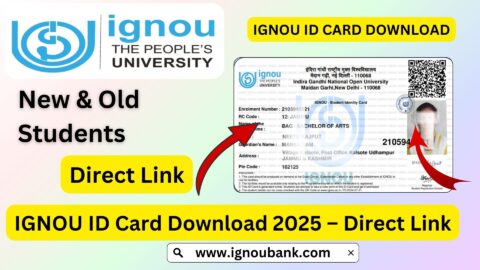
It is a good idea to keep your IGNOU ID card, admission documents or other university records nearby if you are unsure about your enrolment number or programme code.
The official status portal itself asks users to enter the enrolment number and programme code.
Why Is My IGNOU Project Status Not Updated?
One of the most common concerns among students is that their project status is not visible even though they have already submitted the project.
There can be several reasons for this.
The project may still be waiting for processing or evaluation. Another possibility is that the marks or grades have not yet been transmitted by the concerned Study Centre or Regional Centre.
This is particularly important because the official IGNOU status portal does not describe the status as being immediately available after submission. Instead, it states that the status will be reflected after marks or grades are transmitted following the evaluation process.
Therefore, students should not assume that an unavailable status automatically means that their project submission has failed.
If you have proof of submission, keep that proof safely until your project marks or status are properly updated.
What Should You Keep After Submitting an IGNOU Project?
Students should keep records related to their project submission. Depending on the submission method applicable to their programme and session, useful records may include:
- Project submission receipt
- Online submission confirmation
- Screenshot of successful submission
- Email acknowledgement, where applicable
- Copy of the submitted project PDF
- Approved synopsis or proposal, where applicable
- Project guide-related documents
- Fee payment receipt, where applicable
Keeping these documents can be useful if you need to contact your Regional Centre or the relevant IGNOU department regarding your project.
IGNOU’s project submission instructions have also emphasized that project reports must meet the applicable submission requirements. For online submissions, the university has instructed students to provide project reports in the required format and include relevant learner details.
IGNOU Project Status and Project Evaluation
Project evaluation requirements can differ depending on the programme. A project may involve evaluation of the written report and, where applicable, a viva-voce.
For example, IGNOU programme-specific project guidelines can prescribe separate marks for the project report and viva-voce. In one current IGNOU project guideline, the report and viva are treated as separate components, demonstrating why students should carefully follow the requirements applicable to their particular programme.
This means students should not assume that every IGNOU programme follows exactly the same project evaluation pattern.
If your programme includes a viva-voce, you should also follow instructions issued by your concerned Regional Centre or programme coordinator.
IGNOU Project Status vs Grade Card
The project status page and the grade card serve different purposes.
The project status page is useful for checking the available transmission/status information associated with assignments, projects and practical awards or marks.
The grade card is used to view the academic marks or grades recorded for the relevant components of your programme.
If your project has been evaluated but the marks are not yet visible in the grade card, there may be a processing or updating gap between the evaluation/transmission stage and the final grade-card update.
Students should therefore check both the relevant status page and their grade card when they are waiting for project marks.
What If My IGNOU Project Status Shows No Information?
If no information appears after you enter your details, first check whether you entered the correct enrolment number and programme code.
You should also consider the following:
- Confirm that you used the correct enrolment number.
- Check that the programme code is correct.
- Make sure your project was submitted through the method prescribed for your programme.
- Keep your submission receipt or acknowledgement.
- Check the status again after the relevant evaluation process.
- Contact your Regional Centre if the issue continues.
- For project-related queries, IGNOU’s published information lists the Project Section email as projects@ignou.ac.in.
When contacting IGNOU, provide complete details rather than sending only a short message such as “project status not updated.”
You can include your name, enrolment number, programme code, Regional Centre, course code, project submission date, submission method and proof of submission.
How Long Does IGNOU Project Status Take to Update?
There is no single universal update time that applies to every IGNOU project and every programme.
The status depends on the submission, processing, evaluation and transmission of marks or grades by the concerned authorities. The official portal makes clear that the status becomes available when marks or grades are transmitted after evaluation.
Therefore, students should avoid treating a fixed number of days as a guaranteed update period.
If your project was submitted recently, some waiting may be normal. If a substantial amount of time has passed and your project status remains unavailable, you can contact the concerned Regional Centre with your submission proof.
IGNOU Project Status for Dissertation, Internship and Field Work
The IGNOU evaluation system is not limited to conventional project reports.
Depending on the programme, students may need to complete a dissertation, internship, field work journal, practicum or another project-related academic component.
The Student Evaluation Division identifies project reports, internships, field work journals, dissertations and viva-voce among the components involved in student evaluation.
Therefore, students should follow the specific instructions provided for their programme instead of assuming that the submission process is identical for every IGNOU course.
Important Things to Remember
Before checking your IGNOU project status, keep the following points in mind:
- Use the official status portal.
- Enter your correct enrolment number.
- Select the correct programme code.
- Keep your project submission proof safely.
- Do not assume that an immediate absence of status means rejection.
- Remember that the official portal says status is reflected after marks or grades are transmitted following evaluation.
- Check your grade card separately for academic marks or grades.
- Contact your Regional Centre if your issue continues.
- For project-related queries, you can also refer to the Project Section contact information published by IGNOU.
- Always follow the project guidelines applicable to your specific programme.
Direct Link to Check IGNOU Project Status
Students who want to check their IGNOU project status online can use the direct status portal below:
IGNOU Project Status: https://isms.ignou.ac.in/changeadmdata/StatusAssignment.asp
On this page, enter your enrolment number and select your programme code. The portal is officially labelled as the Assignment/Project/Practical Awards/Marks Transmission Status page.
FAQ about IGNOU Project Status 2026
How can I check my IGNOU project status?
You can check your IGNOU project status online by visiting the official status portal at:
https://isms.ignou.ac.in/changeadmdata/StatusAssignment.asp
Enter your enrolment number, select your programme code and submit the details.
What details are required to check IGNOU project status?
The official portal asks for your enrolment number and programme code. The enrolment number field currently indicates a maximum of 10 digits.
Is the IGNOU project status updated immediately after submission?
Not necessarily. The official status page states that the status is reflected only when marks or grades are transmitted by Study Centres or Regional Centres after the evaluation process.
What should I do if my IGNOU project status is not showing?
First, verify your enrolment number and programme code. If the information is correct and your project was submitted properly, keep your submission proof and contact your concerned Regional Centre if the status remains unavailable.
Does IGNOU project status show project marks?
The portal is specifically for Assignment/Project/Practical Awards/Marks Transmission Status. The information available depends on whether the relevant marks or grades have been transmitted following evaluation.
Is project status the same as IGNOU grade card status?
No. The project status portal and grade card are separate student services. The project status page deals with assignment, project and practical awards or marks transmission, while the grade card provides the academic record of marks and grades.
What is the official link for IGNOU project status?
The direct link is: https://isms.ignou.ac.in/changeadmdata/StatusAssignment.asp
What if I submitted my project but cannot find its status?
Check your enrolment number and programme code first. If the information is correct, remember that the official portal states that status is reflected after marks or grades are transmitted following evaluation. If the problem continues, contact the appropriate Regional Centre with your project submission proof.
Where can I ask about my IGNOU project?
For project-related queries, IGNOU’s published contact information lists the Project Section email as projects@ignou.ac.in. Students can also contact their concerned Regional Centre for programme-specific project queries.
Does every IGNOU programme have the same project evaluation process?
No. Project requirements and evaluation methods can vary between programmes. Some programmes may include a project report and viva-voce, while others can have different requirements. Students should follow the guidelines applicable to their particular programme.
Conclusion
Checking the IGNOU project status is important for students who have submitted a project, dissertation, internship report, field work journal or another project-related academic component. IGNOU provides an online status page where students can enter their enrolment number and programme code to check the available Assignment/Project/Practical Awards/Marks Transmission Status.
The most important point to remember is that the official portal states that the status is reflected only after marks or grades are transmitted by the concerned Study Centre or Regional Centre following the evaluation process. Therefore, a status that is not immediately visible should not automatically be interpreted as a failed or rejected submission.
If you have already submitted your project, keep your submission receipt, acknowledgement and copy of the submitted report safely. You can then regularly check the official portal and your grade card for updates. If the status remains unavailable after the relevant processing period, contact your Regional Centre or the IGNOU Project Section with complete details and proof of submission.
Direct link to check IGNOU Project Status: https://isms.ignou.ac.in/changeadmdata/StatusAssignment.asp
By using the official status portal and keeping proper submission records, students can track their project-related updates more easily and take appropriate action if any issue occurs.